Labels make releasing a prompt cheap: moving @prod from one version to another takes a second. That is exactly why the
move needs rules. In InsightPrompts the rules live in the API, so they hold whether the move comes from the interface, a script or
an integration.
What the gate checks
For @prod the promotion service checks, in order:
- The version is certified and the prompt is not retired. Certification is the quality verdict; promotion is the release. One does not imply the other.
- Separation of duties. The author of a version cannot promote it to
@prod. There is deliberately no admin exception: an administrator who wrote the version still needs someone else. - Evidence for important prompts. Prompts in criticality Tier 1 or 2 must have at least one recorded evaluation.
- No regression. The candidate's latest evaluation score must be at least the score of the version currently on
@prod, minus a tolerance. Scores are on a 0–5 scale and the default tolerance is 0.25 (PROMPT_EVAL_REGRESSION_TOLERANCE).
If any check fails, nothing moves. The API answers with a 409 and the list of blockers, for example "separation of duties: the author of a version cannot promote it to prod" or "tier 1–2 prompts must have at least one evaluation", and the interface shows them in a gate alert next to the Promote button.
Who may move @prod at all
Even when every check would pass, only an admin or the prompt's technical approver can promote or
roll back @prod directly. Everyone else asks.
The request path: Reviews
An author who wants their version in production uses Request promotion. That creates an approval request of type promotion, carrying the target label and the exact version, a priority, a reason, a business justification and the reviewers they want. It lands in the Reviews queue, which also holds versions waiting for certification.
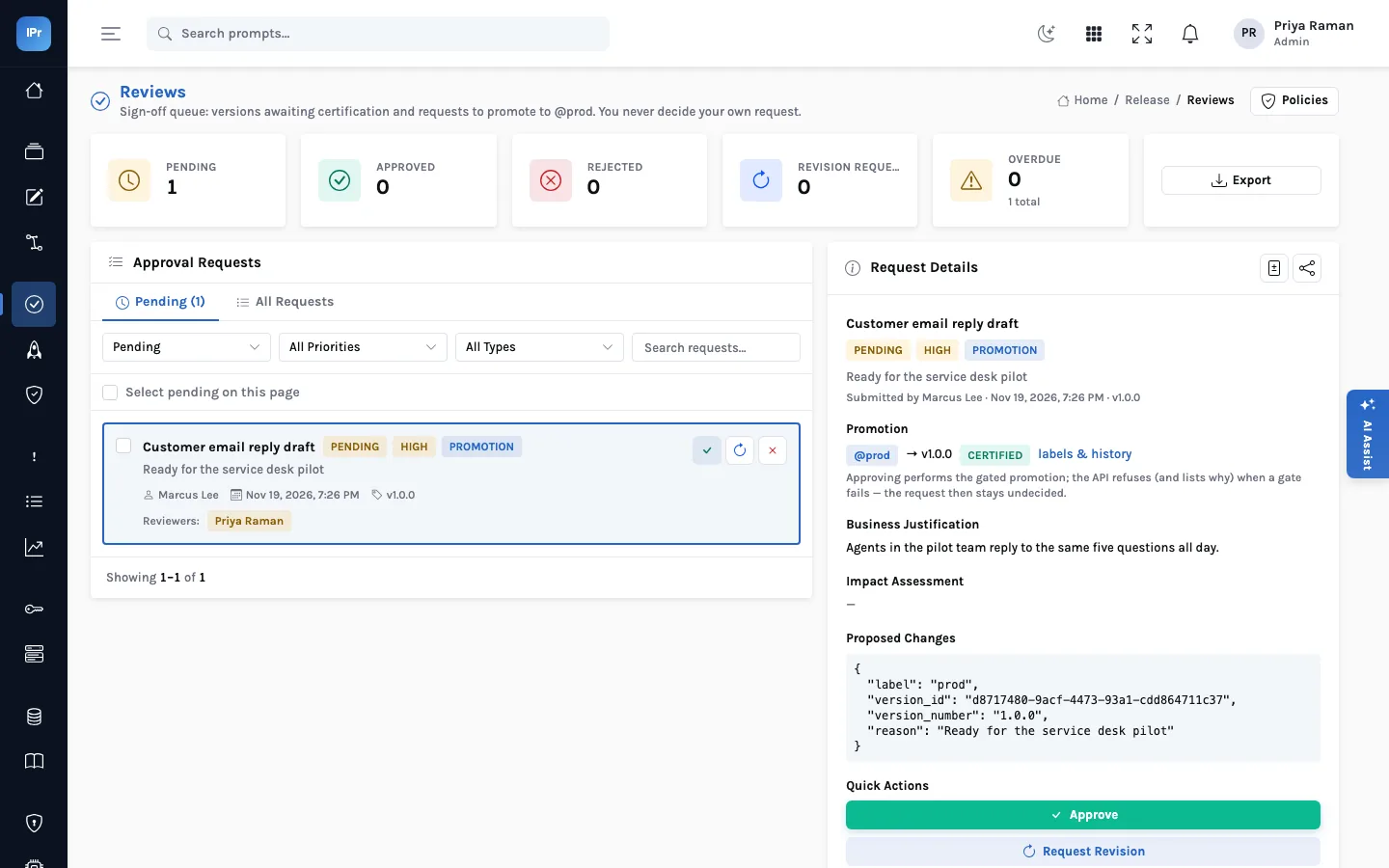
The reviewer sees what would change (here @prod → v1.0.0), why, and the version's certification. Approving the request
performs the promotion, through the same gate. If the gate blocks it, the request stays undecided and the reviewer sees the blockers,
so approval can never sneak around the rules. The queue is built for sign-off, and its subtitle says so: you never decide your own
request.
Why the regression check compares to production
An absolute threshold ("score must be at least 4") sounds simpler but ages badly: the bar is either too low for a mature prompt or too high for a new one. Comparing against what production serves today asks the question reviewers actually care about: is this change at least as good as what customers get now? The tolerance stops small, noisy differences from blocking a release.
Two people, one release
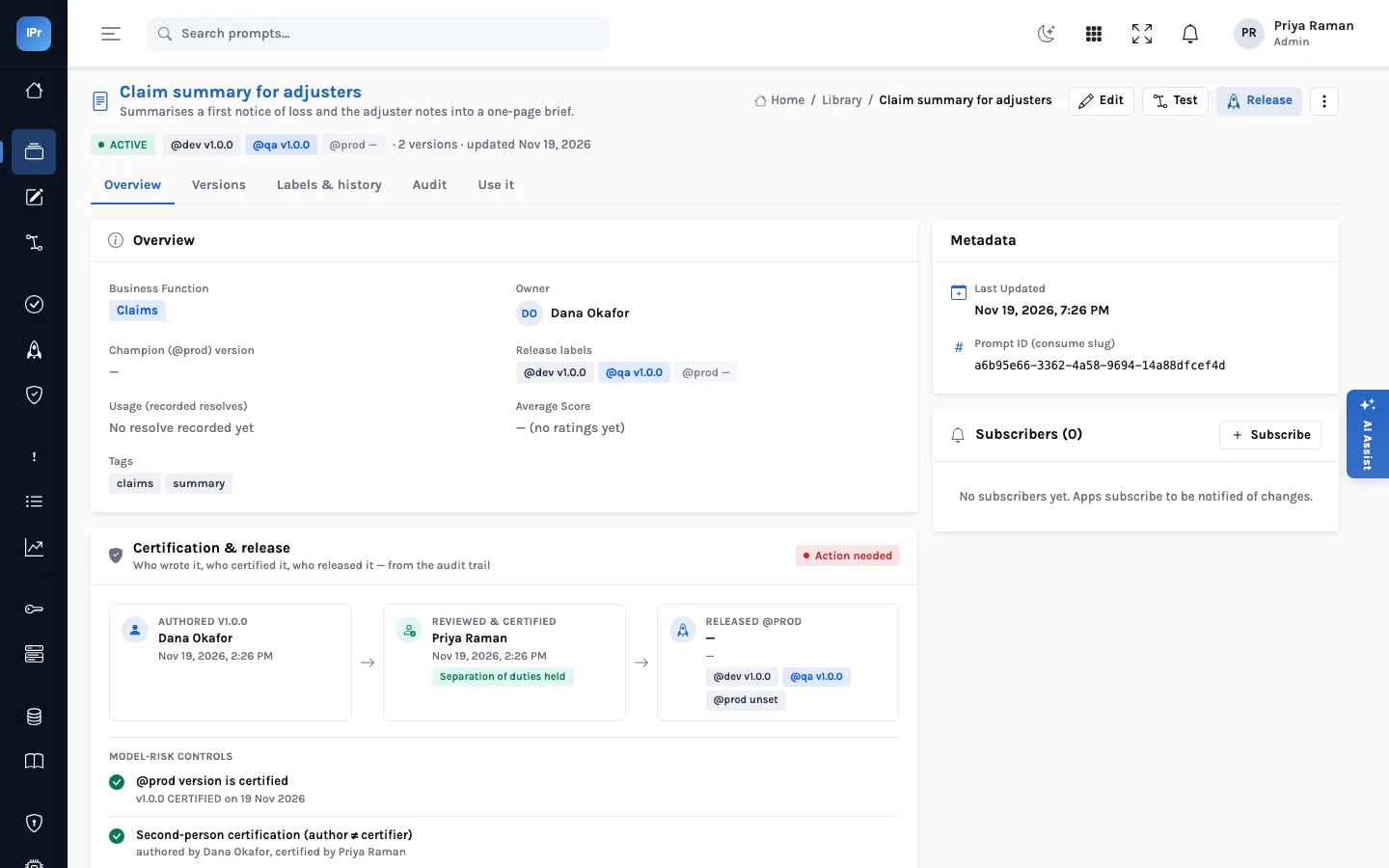
Marcus Lee wrote v1.0.0 of the Customer email reply draft prompt for the service desk. Priya Raman, its technical approver, certified it and moved @dev and @qa. Marcus then asked for @prod through Reviews, high priority, with the justification that the pilot team answers the same five questions all day.
When Priya approves, the gate runs. The prompt is Tier 2, so unless an evaluation is on file the gate reports tier 1–2 prompts must have at least one evaluation and the request stays open. Once the golden set has been run and the score is recorded, the same approval goes through, and the promotion history shows Marcus as author and Priya as the person who released it.
The regression check, worked through
The arithmetic is simple, and it helps to see it once. Suppose, purely as an illustration, that the version on @prod has a
latest evaluation of 4.10 and the tolerance is the default 0.25. The bar for the candidate is 4.10 − 0.25 = 3.85.
| Candidate's latest evaluation | Result |
|---|---|
| 4.30 | Passes: better than production |
| 3.90 | Passes: slightly lower, but within the tolerance |
| 3.80 | Blocked: “eval regression: … scores 3.80 vs 4.10 on @prod (tolerance 0.25)” |
| None on file, Tier 3 prompt | Passes the evaluation checks (separation of duties still applies) |
| None on file, Tier 1 or 2 prompt | Blocked: an evaluation of the candidate is required before @prod |
Three details decide which numbers are compared:
- Latest, of exactly that version. The gate reads the most recent scored evaluation of the candidate and of the version
on
@prod. Running a new evaluation replaces the number the gate sees, for better or worse. - Only evaluations of record count. A run on a subset of the golden set, or one where someone overrode the generation model or the judge, is kept on file but never used by the gate or the register.
- The first release has no baseline. When nothing is on
@prodyet, there is nothing to regress against, so only the "Tier 1–2 needs an evaluation" rule applies.
Whatever the outcome, the gate's record (candidate and baseline versions, their scores, the evaluation ids and the tolerance) is stored
on the promotion event, so the history shows not just that @prod moved but what evidence it moved on.
What the gate does not cover
- Rollbacks skip separation of duties and the regression check, because they restore a version that already served. They still need the target to be certified and not deprecated or retired.
- @dev and @qa have lighter rules:
@qaneeds a certified version;@devaccepts any version that is not deprecated or retired. - Experiment winners are not a shortcut. Promoting the winning variant of a completed experiment goes through the same promotion service, so the same blockers apply.
How to decide on the tolerance
The tolerance is one setting for the whole deployment, read from PROMPT_EVAL_REGRESSION_TOLERANCE. Lowering it makes the
gate stricter but also more sensitive to the judge's own variation between runs; raising it lets more change through without a second
look. Before changing it, run the same version's golden set two or three times and look at how much its score moves on its own. A tolerance
smaller than that spread will block releases for noise. If you need a stricter bar for a specific prompt, a better lever is a larger,
sharper golden set for that prompt.
Frequently asked questions
Can we turn the gate off for a hotfix?
Not through the interface or the API. For a production problem the fast path is a rollback, which an admin or the technical approver can do at once. The fix then goes through the gate as a new version.
What if two people try to promote at the same time?
Promotions for one prompt lock the prompt's row, so they happen one after the other. The second attempt is refused if the label already points at that version.
Who is told when @prod moves?
Every move writes an audit event, and subscribers who asked for @prod alerts are notified on Slack when a Slack token is
configured (email alerts are only logged for now). The calling apps do not
need to be told: their next call resolves the new version.
What this gives you
- No single person can write and ship a production prompt.
- Important prompts cannot reach production without evidence, and cannot get worse than what production serves now.
- Every block comes with a reason, and every release with a name.
See the claims summary walkthrough for the whole path end to end, or how to build the golden set the gate relies on.